
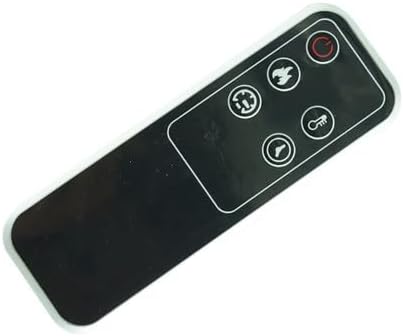
HCDZ Replacement Remote Control for HEAO 2401-BE GFI-24 01-99 Electric Fireplace 3D Infrared Fireplace Stove
Product details
| Management number | 246985197 | Release Date | 2026/08/16 | List Price | US$9.19 | Model Number | 246985197 | ||
|---|---|---|---|---|---|---|---|---|---|
| Category | |||||||||
🚨 Important: Read Before Use & Troubleshooting Guide 🚨 To ensure your replacement remote works perfectly, please follow these instructions. Most reported issues are simple to resolve and are not product defects. 1. Compatibility & First-Time Setup Confirmed Compatibility: This remote is designed to replace the original for HEAO models 2401-BE, GFI-24, 01-99, and similar 3D Infrared Electric Fireplace Stoves. No Programming Needed: This is a true plug-and-play replacement. It typically requires no code setup or programming and should work immediately with your fireplace. 2. How to Use Your Remote Correctly Power Your Fireplace: Ensure your electric fireplace is plugged into a working power outlet. The unit must have power for the remote to function. Aim Directly: Point the remote directly at the infrared receiver on the fireplace unit itself (usually located behind the front glass or mesh panel), not at the wall or from an extreme angle. Clear Line of Sight: Make sure there are no obstructions between the remote and the fireplace. Be Patient: Some fireplace models have a slight delay. Press the button firmly and allow 2-3 seconds for the command to register. 3. Troubleshooting - If Your Remote Isn't Working: ✅ Step 1: Verify Power Source Confirm the fireplace is plugged in and the power outlet is functional. Check your home's circuit breaker if necessary. ✅ Step 2: Recheck Batteries Remove and reinstall the batteries, double-checking the +/- polarity. Try a brand-new set of batteries. ✅ Step 3: Test the Remote Signal Smartphone Camera Test: This is the best way to check if the remote is emitting a signal. Open your phone's camera app. Point the tip of the remote directly at your phone's camera lens. Press and hold any button (e.g., Power). If you see a flickering white or purple light on your phone's screen, the remote is working correctly. If you see no light, the issue is with the batteries or remote. ✅ Step 4: Check Fireplace Manual Consult your HEAO fireplace user manual. Some models may require a reset procedure when pairing with a new remote. 4. Our Commitment & How to Get Help Contact Us First for Support: If you have followed all steps and still experience issues, please message us directly through Amazon before leaving feedback or filing a complaint. We are experts in this product and can provide personalized troubleshooting to solve your problem. We Guarantee a Solution: We are committed to ensuring every customer is satisfied and will work with you until the issue is resolved.
- ✔️ Guaranteed Compatibility & Plug-and-Play Setup: This replacement remote is specifically engineered for HEAO electric fireplace models including 2401-BE, GFI-24, and 01-99. It's a true plug-and-play device, requiring no complicated programming or code setup for immediate use, making replacement effortless.
- ✨ Complete Functionality for Ultimate Comfort: Take full command of your electric fireplace from the comfort of your couch. This remote offers comprehensive control over power, temperature settings (up/down), timer functions, and flame effects, replicating the full convenience of your original remote.
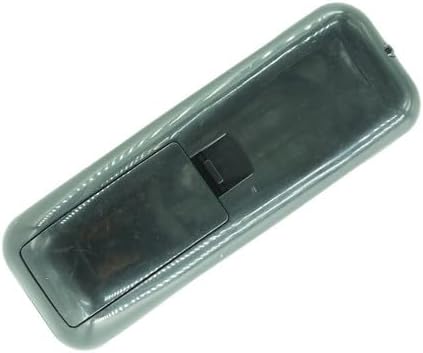
- 🔋 Simple Setup Guide & Smart Battery Tips: For instant operation, install two new AAA batteries, ensuring correct positive (+) and negative (-) polarity—the most common fix for non-responsiveness. For best performance, we recommend using high-quality alkaline batteries and pointing the remote directly at the fireplace's front panel.
- 🔍 Easy Self-Diagnosis & Troubleshooting Support: Most issues are simple to resolve. If the remote is unresponsive, first check that your fireplace is plugged in. Then, use the smartphone camera test: point the remote at your phone's camera and press a button; a flashing light confirms it's working. Our detailed online guide provides more step-by-step solutions.
- 🤝 Reliable Support & Satisfaction Promise: Your satisfaction is our priority. Please contact us directly via Amazon Messenger with any questions before reporting an issue. Our dedicated support team is expert in this product and will provide personalized troubleshooting to ensure your problem is solved quickly and efficiently.
| ASIN | B0CLGMR9ML |
|---|---|
| Brand | HCDZ |
| Color | Black |
| Battery Type | Alkaline AAA |
| Manufacturer | HCDZ |
| Model Number | B0CLGMR9ML |
| Maximum Range | 8 Meters |
| Button Quantity | 3 |
| Controller Type | Button Control |
| Compatible Devices | fireplace |
| Additional Features | No Programming Required |
| Number of Batteries | 2 AAA batteries required. |
| Warranty Description | 90 days warranty |
| Connectivity Technology | Infrared |
| Maximum Number of Supported Devices | 1 |

Bestseller ranking
Procedure Trays



Customers who viewed this product also viewed
Card Tables
Correction of product information
If you notice any omissions or errors in the product information on this page, please use the correction request form below.
Correction Request Form